Firstly, I used https://developers.meethue.com/develop/get-started-2/ to find the IP address that my Phillips Hue Bridge was on, generate an API key, as well as looking at what lights I have connected.
There is also some information on what HTTP requests are used to control the light; I have used GET requests to see what state the light is in, such as whether it’s turned on, the saturation, brightness, and hue levels, as well as the colour. This information is displayed in a JSON format.
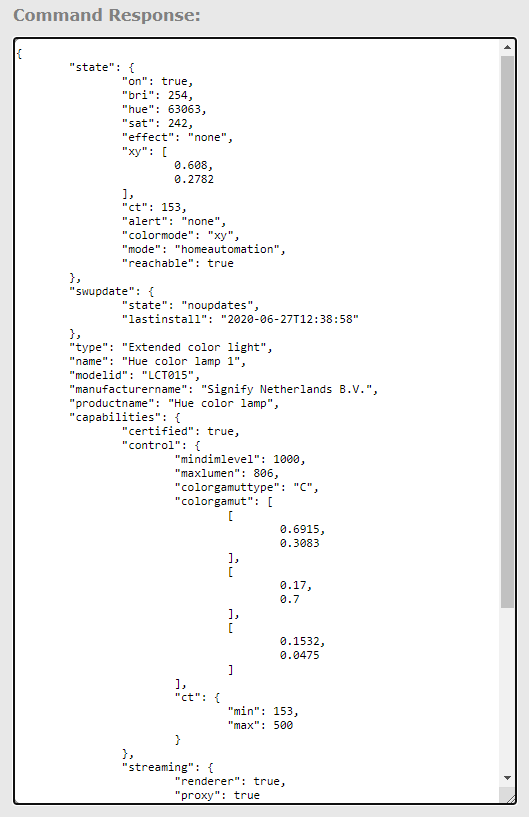
To set the state of the light I have used PUT requests. I then did some experimenting using the CLIP API debugger.
The documentation for what actions the different requests do can be found at https://developers.meethue.com/develop/hue-api/.
To control the light in Processing I needed to figure out how to do PUT requests. I thought I had found a Processing sketch I could’ve used but it didn’t work. This led me to https://forum.processing.org/two/discussion/23026/how-to-send-http-put-request and eventually this library: https://github.com/acdean/HTTP-Requests-for-Processing. Getting the library to work properly was a little confusing, I had to include the PostRequest Java file directly in the sketch since that has a method, method(), that isn’t in the version that is in the library.
Once I had the PUT requests working, I was then able to interface with the light through Processing.
A simple sketch I wrote to randomise the colour and loop through the brightness level of the light:
import http.requests.*;
public void setup()
{
smooth();
GetRequest get = new GetRequest(“http://192.168.1.201/api/aN-2gDI1JkTvIyZ-YoPoK5tam-JKHDN2KMfRpwqS/lights/1”);
get.send();
println(“response: ” + get.getContent());
}
public void draw() {
for (int i = 0; i < 255; i++) {
String input = “{\”xy\”:[” + random(1) + “, ” + random(1) + “], \”bri\”:” + i + “}”;
PostRequest put = new PostRequest(“http://192.168.1.201/api/aN-2gDI1JkTvIyZ-YoPoK5tam-JKHDN2KMfRpwqS/lights/1/state”);
put.method(“PUT”);
put.addJson(input);
put.send();
}
}
The format for sending PUT requests to the light is http://<IP ADDR>/api/<API KEY>/lights/<LIGHT NUMBER>/state
The format for sending GET requests is http://<IP ADDR>/api/<API KEY>/lights/<LIGHT NUMBER>
The next step is to incorporate some of these requests in to the visualisation tool. Namely, how convert from RGB colour mode to CIE (https://medium.com/hipster-color-science/a-beginners-guide-to-colorimetry-401f1830b65a) which is what the Hue uses.
 Home
Home 