Toby suggested that adding a pause button would be beneficial to the program. In order to do this I needed to look in to noLoop() and loop(), which are both Processing functions to stop Processing from calling draw() and then to resume calling draw().
This lead me to https://forum.processing.org/one/topic/start-stop-pause-processing.html which user GoToLoop describes how to use the noLoop() and loop() functions, as well as the internal variable “looping” which looks to see if draw() is active.
They did it using a key press, but I decided to use a ControlP5 button to handle this functionality.
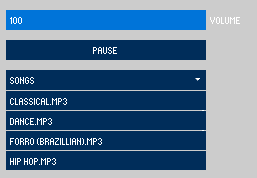
To use ControlP5 buttons you have to have a function with the same name as the button. I then made a pause() function and used the same logic described by GoToLoop. I had to add some additional functionality to pause and play the song when the button is pressed.
ControlP5 buttons are pressed upon the sketch starting. This meant that the sketch would pause and I would have to unpause it using a key press before I could play a song or properly start my sketch. This lead me to https://forum.processing.org/two/discussion/1368/controlp5-buttons-controls-trigger-automatically-on-sketch-start, in which user Sojamo describes how to stop this from happening using .setBroadcast(). By setting it as false and then initialising the other properties of the button before setting it back to true meant that it does not carry out any functionality when the sketch is loaded up.

