“Synaesthesia is a condition in which someone experiences things through their senses in an unusual way, for example by experiencing colour as a sound, or a number as a position in space.”
Cambridge Dictionary
Lighter stimuli were more associative with higher pitches, and likewise for darker stimuli, they were for lower pitches.
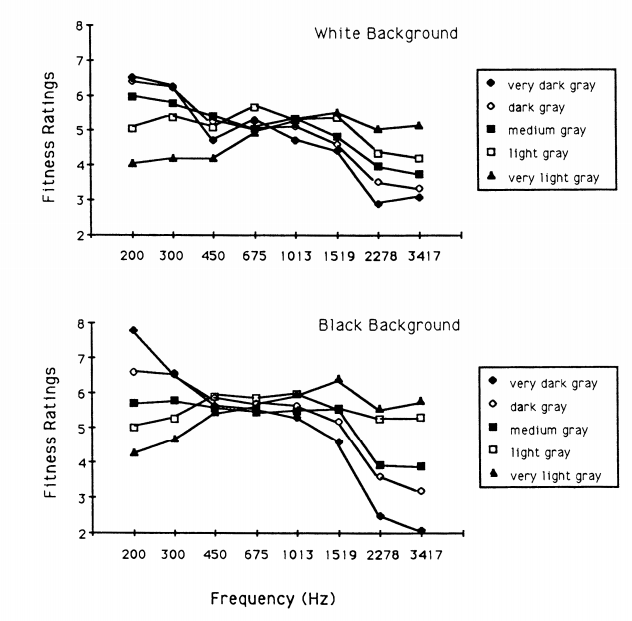
The patterns of stimuli seemed to be stronger against a black background as opposed to a white background (something to consider for the project). However, the strength here dissipates when there is a large set of lightness levels “from which to choose the visual lightness level”.
Larger melodic intervals produced extreme choices in stimuli.
Lighter stimuli were chosen for ascending melodic intervals, and like with pitch, darker stimuli were chosen for descending melodic intervals.
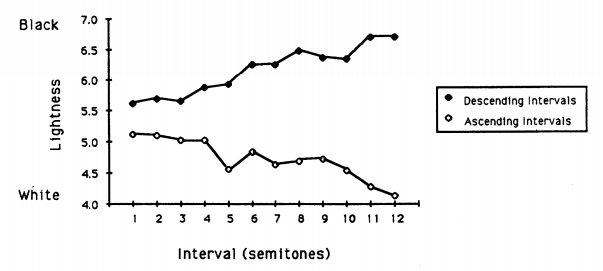
Nonsynesthetes are reliably able to correctly reproduce (or imagine?) the same qualities that synesthetes experience which leads to whether, as Marks (1974, 1974) points out, stimuli in different senses might tap a “common connotative meaning mediated by higher cognitive processes”. –> This could lead to an application of this project outside of the production of the project.
Pitch is not unidimensional (one dimensional) but has at least two different dimensions: pitch height (absolute frequency) and tone chroma (relative location of the pitch within a scale collapsed across octaves). –> To build on this, Bachem (Tone Height and Tone Chrome as Two Different Pitch Qualities, 1950) looked at tone height and tone chroma. “the general term ‘tone chrome’ refers to the quality common to all musical tones with the same denomination.” Within his summary he says that Tone chroma is an exact logarithmic function of frequency, represented by the mantissa (part after decimal point) in log base 2.
References:
https://dictionary.cambridge.org/dictionary/english/synaesthesia
Hubbard, Timothy L. ‘Synesthesia-like Mappings of Lightness, Pitch, and Melodic Interval’. The American Journal of Psychology 109, no. 2 (1996): 219–38. https://doi.org/10.2307/1423274.
Bachem, A. ‘Tone Height and Tone Chroma as Two Different Pitch Qualities’. Acta Psychologica 7 (1 January 1950): 80–88. https://doi.org/10.1016/0001-6918(50)90004-7.






 Home
Home 